





CData Connect AI MCP Server を使って Moonlit Workflow と GitHub のデータを接続

Moonlit は、柔軟なオーケストレーションブロックを通じて、自動化されたワークフローや AI 駆動のプロセスを設計できるプラットフォームです。しかし、ワークフローが CRM、ERP、財務、分析、クラウドアプリケーションなどのリアルタイムのエンタープライズデータに依存する必要がある場合、開発者はカスタムバックエンドロジックやスケジュール同期に頼らざるを得ないことがあります。これにより、メンテナンスの負担が増加し、ワークフローは古いデータスナップショットに制限されてしまいます。
CData Connect AI は、セキュアな Model Context Protocol(MCP)Server を通じて 300 以上のエンタープライズシステムへのリアルタイムアクセスを提供することで、この問題を解決します。Moonlit ワークフローは、ワークフローからの質問を CData Connect AI に転送する軽量な Claude ベースのエージェントサービスを使用して、リアルタイムのデータと対話できます。
このガイドでは、Claude MCP エージェントの設定、リアルタイムツールアクセス用の FastAPI エンドポイントのデプロイ、Moonlit へのエージェントの公開、そして CData Connect AI を通じてリアルタイムデータで動作するワークフローの構築手順を説明します。
前提条件
- CData Connect AI アカウント
- Python 3.9 以上のインストール
- Anthropic API キー(Claude)
- Moonlit が有効で、Connected Apps の作成・管理権限を持つ GitHub のデータ 組織
認証情報チェックリスト
開始する前に、以下の認証情報を用意してください。
CData Connect AI MCP
- USERNAME:CData ログインメールアドレス
- PAT:Connect AI で Settings に移動し、Access Tokens をクリック(コピーは一度のみ可能)
- MCP_BASE_URL:https://mcp.cloud.cdata.com/mcp
Moonlit
- Workflow Builder へのアクセス権を持つ Moonlit アカウント
- ngrok のインストールと認証
Step 1: Moonlit 向けに GitHub の接続を設定
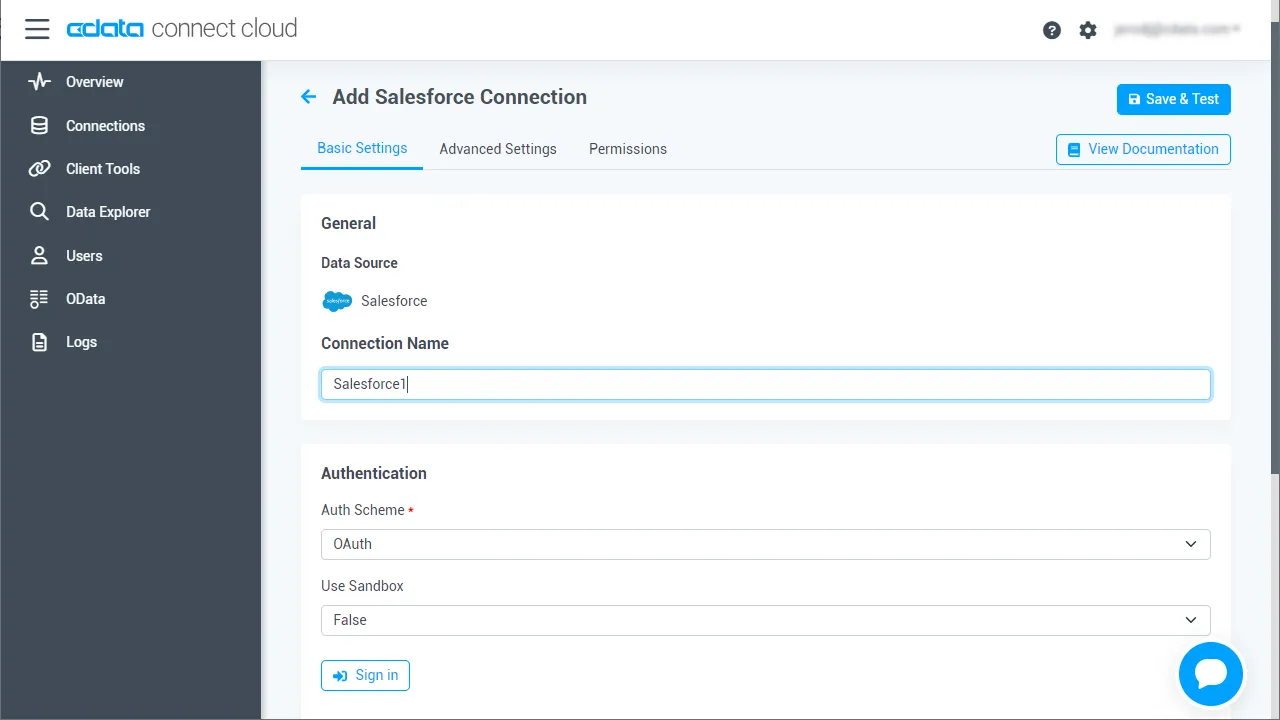
Moonlit から GitHub への接続は、CData Connect AI Remote MCP によって実現されます。Moonlit から GitHub のデータ を操作するには、まず CData Connect AI で GitHub 接続を作成・設定します。
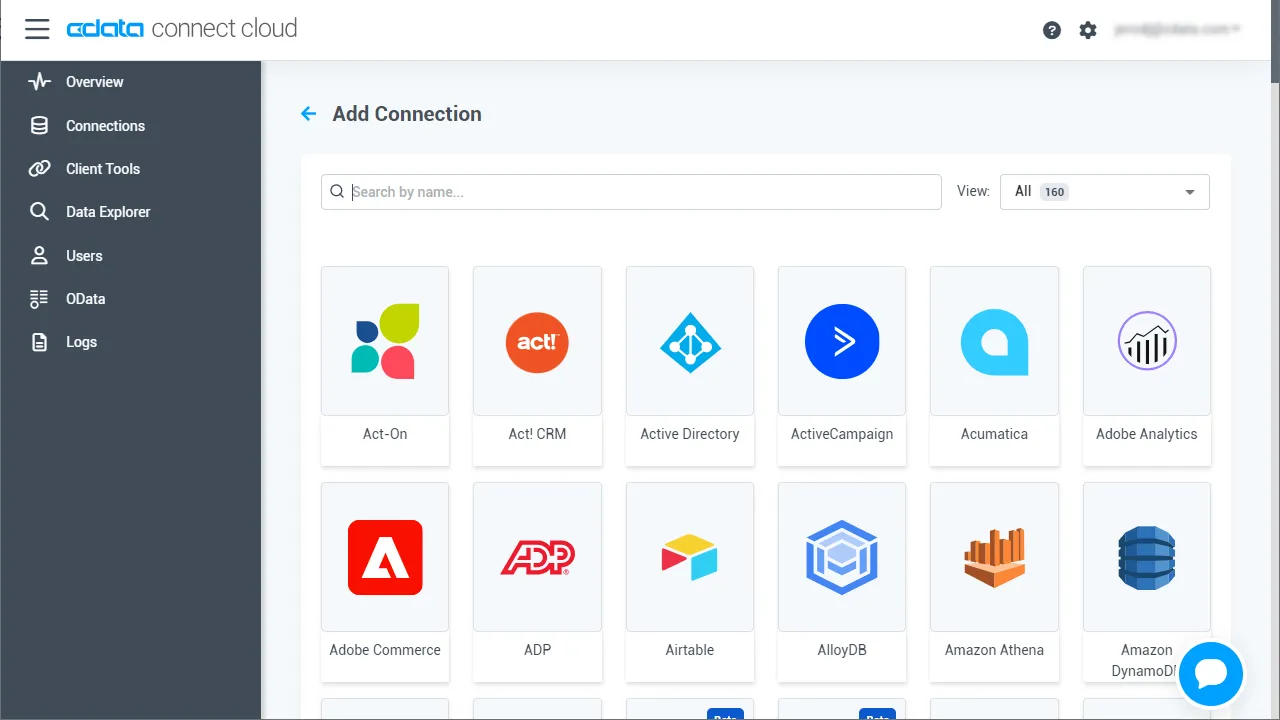
- Connect AI にログインし、Sources をクリックしてから Add Connection をクリックします。
- Add Connection パネルから「GitHub」を選択します。
-
GitHub への接続に必要な認証プロパティを入力します。
GitHub への接続には、OAuth 2 認証標準を使います。OAuth で認証するには、アプリを作成してOAuthClientId、OAuthClientSecret、およびCallbackURL 接続プロパティを取得する必要があります。詳細はヘルプドキュメントの「はじめに」を参照してください。
- Save & Test をクリックします。
-
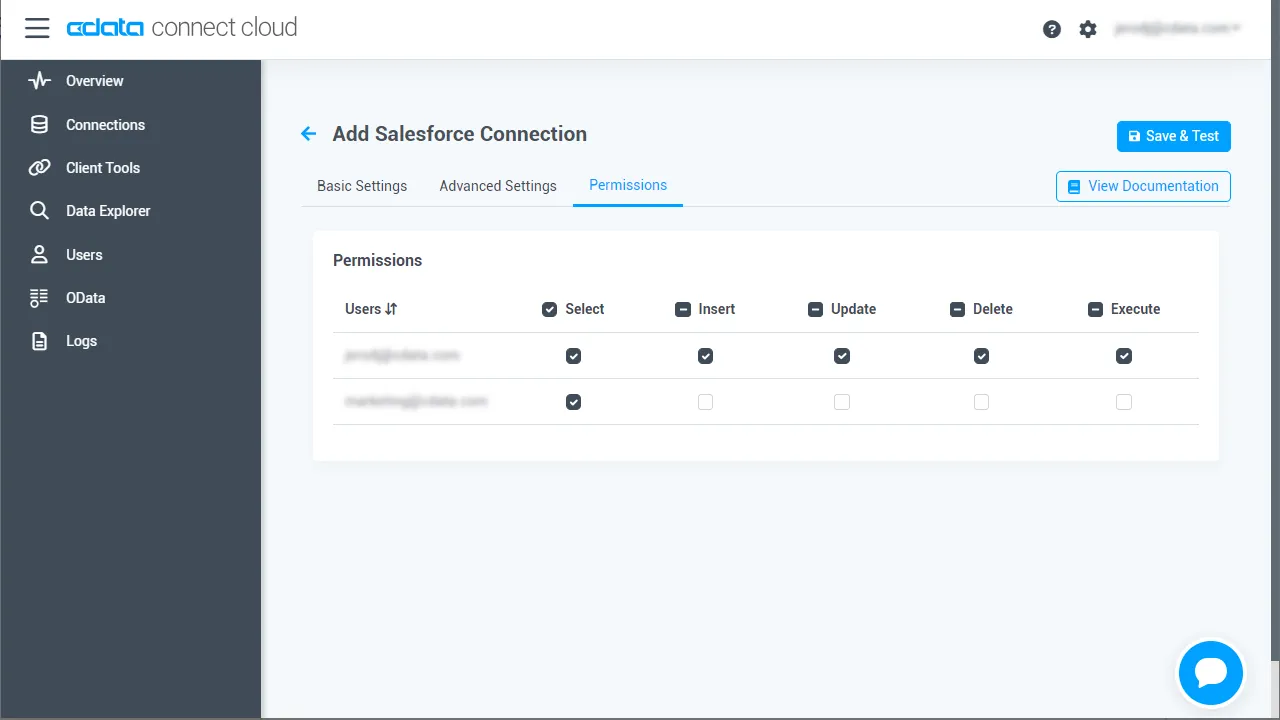
Add GitHub Connection ページの Permissions タブに移動し、ユーザーベースの権限を更新します。
Personal Access Token の追加
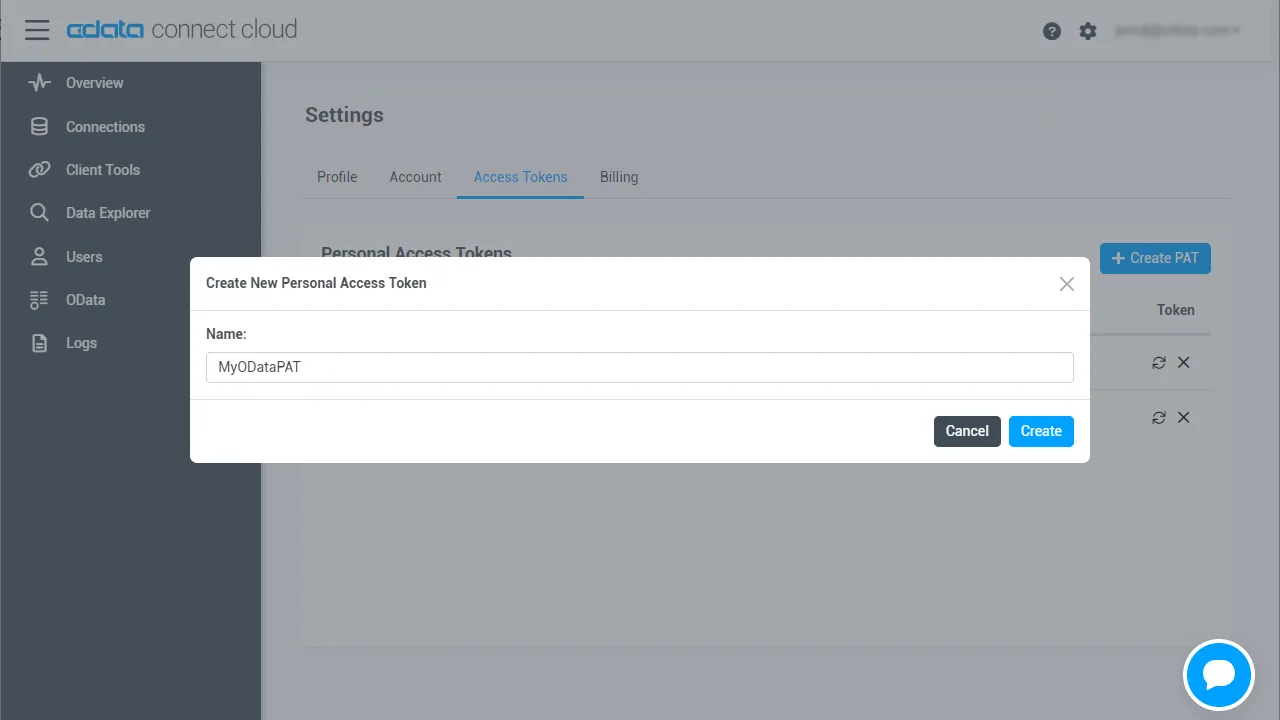
Personal Access Token(PAT)は、Moonlit から Connect AI への接続を認証するために使用されます。アクセスを細かく管理するために、サービスごとに個別の PAT を作成することをお勧めします。
- Connect AI アプリの右上にある歯車アイコン()をクリックして Settings ページを開きます。
- Settings ページで Access Tokens セクションに移動し、 Create PAT をクリックします。
-
PAT に名前を付けて Create をクリックします。
- Personal Access Token は作成時にのみ表示されるため、必ずコピーして安全に保管してください。
Step 2: エージェントリポジトリのクローンと依存関係のインストール
まず、CData MCP エージェントの公式リポジトリをクローンし、連携に必要な Python 環境をセットアップします。
git clone https://github.com/CDataSoftware/connect-ai-claude-agent.git
cd connect-ai-claude-agent
(任意だが推奨)
python -m venv .venv
source .venv/bin/activate   # macOS/Linux
.venv\Scripts\activate      # Windows
依存関係のインストール
pip install -r requirements.txt
pip install fastapi uvicorn python-dotenv pydantic
Step 3: 環境変数の設定
.env ファイルをコピーして設定します。
cp .env.example .env
値を更新します。
ANTHROPIC_API_KEY=your_anthropic_key_here
CDATA_EMAIL=your_email
CDATA_ACCESS_TOKEN=your_cdata_pat
MCP_SERVER_URL=https://mcp.cloud.cdata.com/mcp/
Step 4: CData Connect AI Claude エージェントの追加
agent_chatbot.py を以下の完全版に置き換えます。
#!/usr/bin/env python3
import os
import json
import base64
import asyncio
from typing import Optional, Dict, Any, List

import requests
from dotenv import load_dotenv
from anthropic import Anthropic

# Load environment variables from .env file
load_dotenv()

class MCPClient:
    """Client for interacting with CData Connect AI MCP server over HTTP."""

    def __init__(self, server_url: str, email: Optional[str] = None, access_token: Optional[str] = None):
        self.server_url = server_url.rstrip("/")
        self.session = requests.Session()

        # Default headers for MCP JSON-RPC over SSE
        self.session.headers.update(
            {
                "Content-Type": "application/json",
                "Accept": "application/json, text/event-stream",
            }
        )

        if email and access_token:
            # Basic authentication: email:personal_access_token
            credentials = f"{email}:{access_token}"
            encoded_credentials = base64.b64encode(credentials.encode()).decode()
            self.session.headers.update(
                {
                    "Authorization": f"Basic {encoded_credentials}",
                }
            )

    def _parse_sse_response(self, response_text: str) -> dict:
        """Parse Server-Sent Events (SSE) response."""
        # SSE format: event: message\n data: {...}\n\n
        for line in response_text.split("\n"):
            if line.startswith("data: "):
                data_json = line[6:]  # Remove 'data: ' prefix
                return json.loads(data_json)
        raise ValueError("No data found in SSE response")

    def list_tools(self) -> list:
        """Get available tools from the MCP server."""
        response = self.session.post(
            self.server_url,
            json={
                "jsonrpc": "2.0",
                "method": "tools/list",
                "params": {},
                "id": 1,
            },
        )
        response.raise_for_status()

        result = self._parse_sse_response(response.text)
        return result.get("result", {}).get("tools", [])

    def call_tool(self, tool_name: str, arguments: dict) -> dict:
        """Call a tool on the MCP server."""
        response = self.session.post(
            self.server_url,
            json={
                "jsonrpc": "2.0",
                "method": "tools/call",
                "params": {"name": tool_name, "arguments": arguments},
                "id": 2,
            },
        )
        response.raise_for_status()

        result = self._parse_sse_response(response.text)
        return result.get("result", {})

class MCPAgentChatbot:
    """
    AI agent chatbot for CData Connect AI using Anthropic's HTTP API.

    - Loads tools from the CData MCP server
    - Maps them to Anthropic 'tools' spec
    - Orchestrates tool_use / tool_result loop without Claude Code CLI
    """

    def __init__(self, mcp_server_url: str, email: Optional[str] = None, access_token: Optional[str] = None):
        # Anthropic client (HTTP only, no CLI)
        api_key = os.environ.get("ANTHROPIC_API_KEY")
        if not api_key:
            raise RuntimeError("ANTHROPIC_API_KEY is not set in the environment/.env")
        self.client = Anthropic(api_key=api_key)

        # Hard-coded model: do NOT use ANTHROPIC_MODEL from env
        self.model = "claude-3-haiku-20240307"
        print(f"Using Anthropic model: {self.model} (hard-coded, env ANTHROPIC_MODEL ignored)")

        # MCP client
        self.mcp_client = MCPClient(mcp_server_url, email, access_token)

        print("Connecting to CData Connect AI MCP server...")
        self.mcp_tools_list = self.mcp_client.list_tools()
        print(f"Loaded {len(self.mcp_tools_list)} tools from MCP server")

        if self.mcp_tools_list:
            print("  Available tools:")
            for tool_info in self.mcp_tools_list[:5]:
                print(f"    - {tool_info.get('name', 'unknown')}")
            if len(self.mcp_tools_list) > 5:
                print(f"    ... and {len(self.mcp_tools_list) - 5} more")

        # Convert MCP tools to Anthropic tools spec
        self.tools_for_claude = self._create_tools_for_claude()

        # Stronger instructions for tool use and final answers
        self.system_prompt = (
            "You are a helpful assistant with access to CData Connect AI tools over MCP. "
            "Use these tools to answer questions about data sources, connections, tables, and queries. "
            "When tools fail or return errors, always explain clearly what went wrong instead of "
            "continuing to call tools. After at most 3 tool calls, you MUST respond with the best "
            "possible final answer using whatever data or error messages you have."
        )

    def _create_tools_for_claude(self) -> List[Dict[str, Any]]:
        """Convert MCP tool definitions into Anthropic 'tools' format."""
        tools = []
        for t in self.mcp_tools_list:
            name = t.get("name")
            if not name:
                continue

            tools.append(
                {
                    "name": name,
                    "description": t.get("description", ""),
                    "input_schema": t.get("inputSchema", {"type": "object", "properties": {}}),
                }
            )
        return tools

    def _run_agent_sync(self, user_message: str) -> str:
        """
        Synchronous agent loop using Anthropic tools API.
        We run this in a thread from async contexts.
        """
        messages: List[Dict[str, Any]] = [
            {
                "role": "user",
                "content": user_message,
            }
        ]

        # Safety: avoid infinite loops
        max_tool_rounds = 6

        # Keep track of the last tool result so we can surface real errors
        last_tool_result_text: Optional[str] = None

        for _ in range(max_tool_rounds):
            try:
                response = self.client.messages.create(
                    model=self.model,
                    max_tokens=1024,
                    system=self.system_prompt,
                    tools=self.tools_for_claude,
                    messages=messages,
                )
            except Exception as e:
                # Surface Anthropic errors (e.g., bad model) as a normal answer
                return (
                    f"Error when calling Anthropic model '{self.model}': {e}. "
                    "Check that the model name is valid for your API key."
                )

            # Extract tool_use contents, if any
            tool_uses = [
                block
                for block in response.content
                if getattr(block, "type", None) == "tool_use"
            ]

            # If no tools requested, return the assistant's text reply
            if not tool_uses:
                texts = [
                    getattr(block, "text", "")
                    for block in response.content
                    if getattr(block, "type", None) == "text"
                ]
                texts = [t for t in texts if t]
                if texts:
                    # Include model tag to make debugging easier
                    return f"[model={self.model}] " + "\n\n".join(texts)
                # No tools and no text – dump raw response for debugging
                return f"[model={self.model}] Raw response:\n" + json.dumps(
                    response.model_dump(), indent=2
                )

            # Add the tool_use content as an assistant message
            messages.append(
                {
                    "role": "assistant",
                    "content": response.content,
                }
            )

            # For each requested tool, call the MCP server and send tool_result back
            tool_result_messages: List[Dict[str, Any]] = []
            for tu in tool_uses:
                tool_name = getattr(tu, "name", None)
                tool_use_id = getattr(tu, "id", None)
                tool_input = getattr(tu, "input", {}) or {}

                try:
                    result = self.mcp_client.call_tool(tool_name, tool_input)
                    result_text = json.dumps(result, indent=2)
                except Exception as e:
                    result_text = f"Error calling tool {tool_name}: {e}"

                # Remember the last tool result for better error messages later
                last_tool_result_text = result_text

                tool_result_messages.append(
                    {
                        "role": "user",
                        "content": [
                            {
                                "type": "tool_result",
                                "tool_use_id": tool_use_id,
                                "content": result_text,
                            }
                        ],
                    }
                )

            messages.extend(tool_result_messages)

        # Fallback if we exit loop without a final answer – but show last tool result
        if last_tool_result_text:
            return (
                f"[model={self.model}] I was unable to produce a final natural-language answer "
                f"after using tools. Here is the last tool result I received:\n\n"
                f"{last_tool_result_text}"
            )
        else:
            return f"[model={self.model}] I was unable to produce a final answer after using tools."

    async def chat_once(self, user_message: str) -> str:
        """Async wrapper around the synchronous agent loop."""
        return await asyncio.to_thread(self._run_agent_sync, user_message)

async def interactive_mode(chatbot: MCPAgentChatbot):
    """Run the chatbot in interactive CLI mode (uses same HTTP-only agent)."""
    print("\nChatbot ready! Type 'quit' to exit.\n")

    while True:
        try:
            user_input = input("You: ").strip()
            if not user_input:
                continue
            if user_input.lower() in ["quit", "exit", "q"]:
                print("Goodbye!")
                break

            response = await chatbot.chat_once(user_input)
            print(f"\nAssistant: {response}\n")

        except KeyboardInterrupt:
            print("\nGoodbye!")
            break
        except Exception as e:
            print(f"Error: {e}\n")

async def main():
    """Run the chatbot in interactive mode (for local testing)."""
    MCP_SERVER_URL = os.getenv("MCP_SERVER_URL", "https://mcp.cloud.cdata.com/mcp/")
    CDATA_EMAIL = os.environ.get("CDATA_EMAIL")
    CDATA_ACCESS_TOKEN = os.environ.get("CDATA_ACCESS_TOKEN")

    print("=== CData Connect AI Agent Chatbot ===")
    print(f"MCP Server: {MCP_SERVER_URL}\n")

    if not CDATA_EMAIL or not CDATA_ACCESS_TOKEN:
        print("CData credentials not found.")
        print("\nThis app requires your CData email and personal access token.")
        print("\nTo configure:")
        print("  set [email protected]")
        print("  set CDATA_ACCESS_TOKEN=your_personal_access_token\n")
        return

    try:
        chatbot = MCPAgentChatbot(MCP_SERVER_URL, CDATA_EMAIL, CDATA_ACCESS_TOKEN)
    except Exception as e:
        print(f"Error connecting to MCP server or Anthropic: {e}")
        return

    await interactive_mode(chatbot)

if __name__ == "__main__":
    asyncio.run(main())
この実装の特徴
- Claude 3 Haiku を使用
- CData Connect AI MCP Server に接続
- MCP ツールを Claude ツールスキーマに変換
- CLI ラッパーに依存せずにツール使用ループを処理
Step 5: FastAPI 連携レイヤーの追加
以下は、POST /ask エンドポイントでエージェントを公開する完全な api_server.py です。
import os
from fastapi import FastAPI, HTTPException
from pydantic import BaseModel
from agent_chatbot import MCPAgentChatbot

app = FastAPI()

# Environment variables (also loaded in agent_chatbot via load_dotenv)
CDATA_EMAIL = os.getenv("CDATA_EMAIL")
CDATA_ACCESS_TOKEN = os.getenv("CDATA_ACCESS_TOKEN")
MCP_SERVER_URL = os.getenv("MCP_SERVER_URL", "https://mcp.cloud.cdata.com/mcp/")

# Instantiate chatbot at startup
try:
    chatbot = MCPAgentChatbot(
        mcp_server_url=MCP_SERVER_URL,
        email=CDATA_EMAIL,
        access_token=CDATA_ACCESS_TOKEN,
    )
except Exception as e:
    # Fail fast if configuration is broken
    raise RuntimeError(f"Failed to initialize MCPAgentChatbot: {e}")

class AskRequest(BaseModel):
    question: str

class AskResponse(BaseModel):
    answer: str

@app.post("/ask", response_model=AskResponse)
async def ask(req: AskRequest):
    try:
        answer = await chatbot.chat_once(req.question)
        return AskResponse(answer=answer)
    except Exception as e:
        # Convert unexpected backend errors into a 500 with a readable message
        raise HTTPException(status_code=500, detail=f"Agent error: {e}")
サーバーの起動
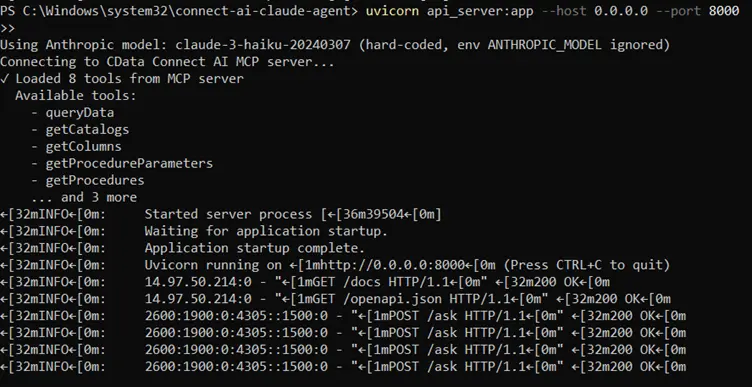
uvicorn api_server:app --host 0.0.0.0 --port 8000
API のテスト
http://localhost:8000/docs
Step 6: ngrok でエージェントを公開
Moonlit やその他の外部アプリケーションが FastAPI エージェントと通信できるようにするには、ローカルサーバーをインターネット経由でアクセス可能にする必要があります。ngrok は、実行中の FastAPI サービスに直接トンネリングするセキュアなパブリック URL を作成します。
- FastAPI サーバーがポート 8000 で実行されていることを確認します。
- 別のターミナルで ngrok トンネルを開始してこのポートを公開します。
- ngrok はパブリックにアクセス可能な HTTPS URL を生成します(例:https://your-ngrok-id.ngrok-free.dev)。この URL、具体的には /ask エンドポイントを、Moonlit で Custom API Request ステップを設定する際に使用します。
uvicorn api_server:app --host 0.0.0.0 --port 8000
ngrok http 8000
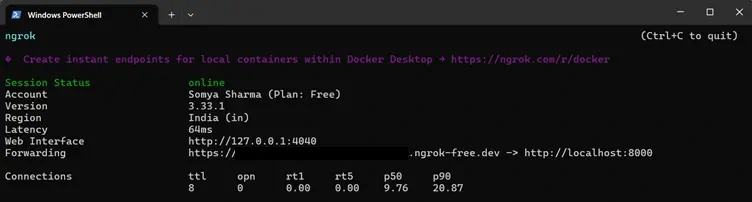
これにより、開発中も Moonlit ワークフローがエージェントサービスに確実にアクセスできるようになります。
Step 7: エージェントを Moonlit に接続
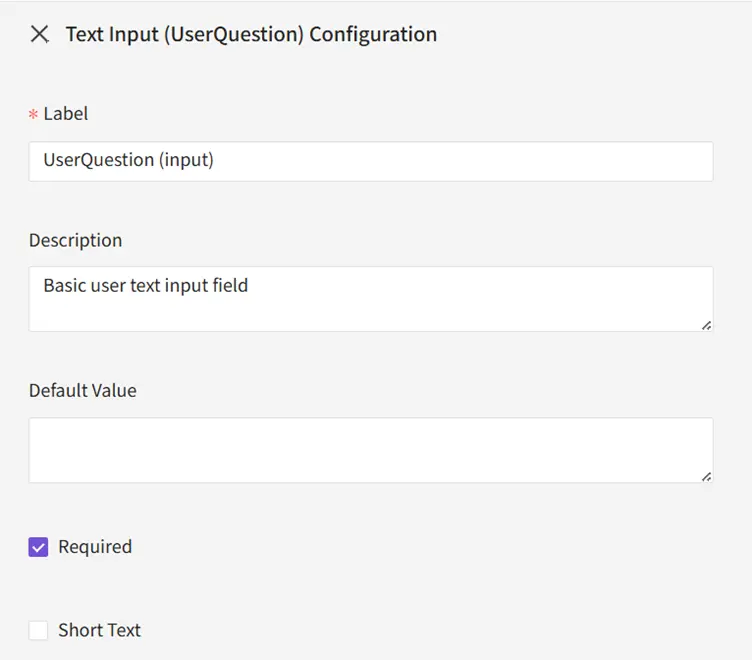
7.1 入力
Text Input:UserQuestion を追加します。
7.2 関数
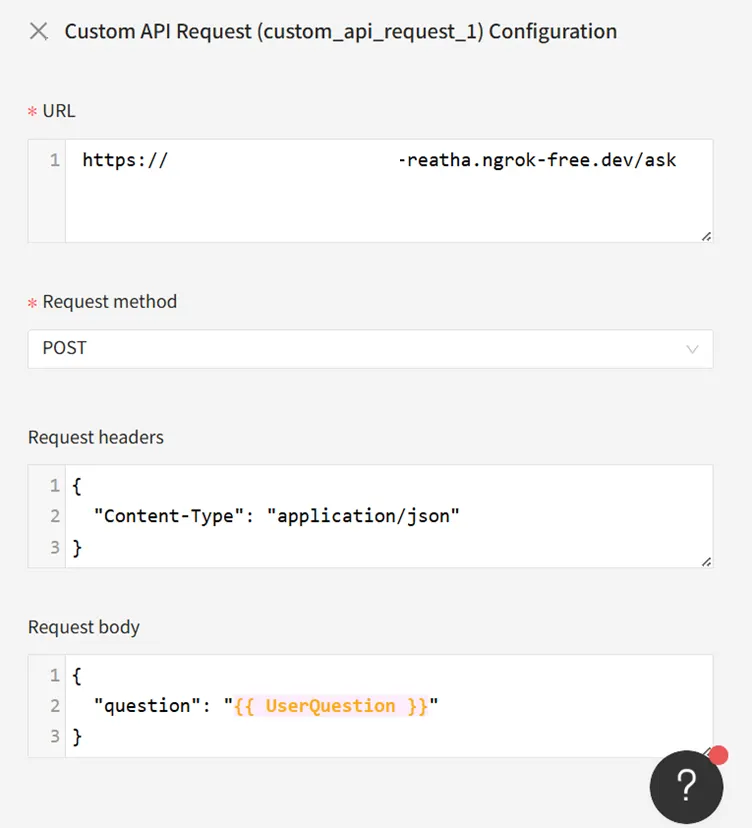
以下を設定します。
- URL:https://your-ngrok-id.ngrok-free.dev/ask
- Method:POST
- Headers:{ "Content-Type": "application/json" }
- Body:{ "question": "{{ UserQuestion }}" }
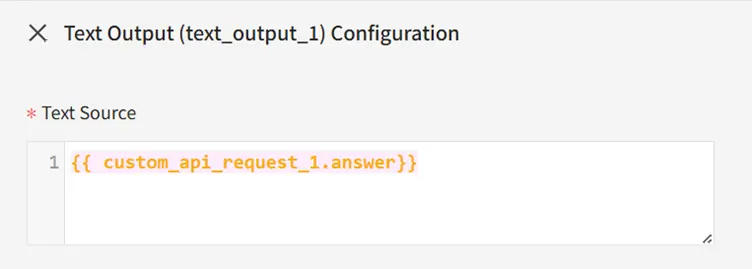
7.3 出力
Text Output:{{ custom_api_request_1.answer }} を追加します。
Step 8: 完全なワークフローのテスト
Moonlit の Test パネルで以下を実行します。
" What are the tools available in CData Connect AI MCP Server."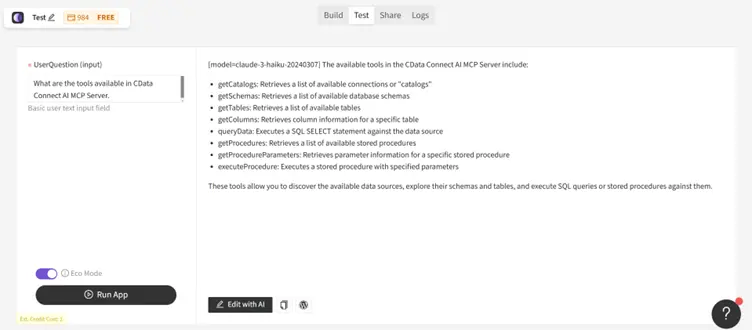
ワークフローは以下のように動作します。
- 入力を FastAPI サービスに送信
- Claude に転送
- Claude が必要に応じて CData MCP ツールを呼び出し
- 根拠のあるリアルタイムの回答が Moonlit に返される
Moonlit と CData でリアルタイムのデータ対応エージェントを構築
Moonlit と CData Connect AI を組み合わせることで、同期パイプラインや手動連携ロジックなしで、エージェントがリアルタイムのエンタープライズデータにアクセスし、インテリジェントに動作する強力な AI 駆動ワークフローが実現します。
無料トライアルを開始して、CData が 300 以上の外部システムへのリアルタイムでセキュアなアクセスで Moonlit をどのように強化できるかをお試しください。