





Biml を使って SurveyMonkey ののデータを SQL Server にレプリケーションする SSIS タスクを構築

SQL Server を重要なビジネスデータのバックアップとして使用することで、データ損失に対する重要なセーフティネットが確保され、レポーティングや分析などの機能とデータを簡単に連携できるようになります。Biml は、SSIS パッケージなどの Microsoft SQL Server BI オブジェクトを作成するために使用できる XML ダイアレクトです。CData SSIS Components と Biml を組み合わせることで、SurveyMonkey のデータへのアクセスを含む SSIS パッケージを簡単に構築できます。主なメリットは以下のとおりです:
- ビルトインのメタデータディスカバリー — CData SSIS Components は、SQL Server と同様にメタデータを公開し、スキーマレスなデータソースに対しても動的にスキーマを生成します
- 動的な SSIS タスク生成 — Biml のコードナゲットを使用して、検出されたメタデータを反復処理しながら SSIS タスクを構築できます
- SurveyMonkey の読み取り — ネイティブのソースコンポーネントにより、SurveyMonkey をデータベースのように扱えます
この記事では、Biml と CData SSIS Components for SurveyMonkey を使用して、SurveyMonkey のエンティティごとに SSIS タスクを動的に構築し、SurveyMonkey のデータを Microsoft SQL Server データベースにレプリケーションする方法を説明します。Biml ファイルをセクションごとに解説し、記事の最後に完全な Biml ファイルを掲載しています。
Visual Studio の SSIS プロジェクトで Biml を使用するには、BimlExpress をインストールします。BimlExpress をインストールしたら、Visual Studio を開き、新しい Integration Services プロジェクトを作成し、新しい Biml ファイルを追加します。
Biml ファイルの構築
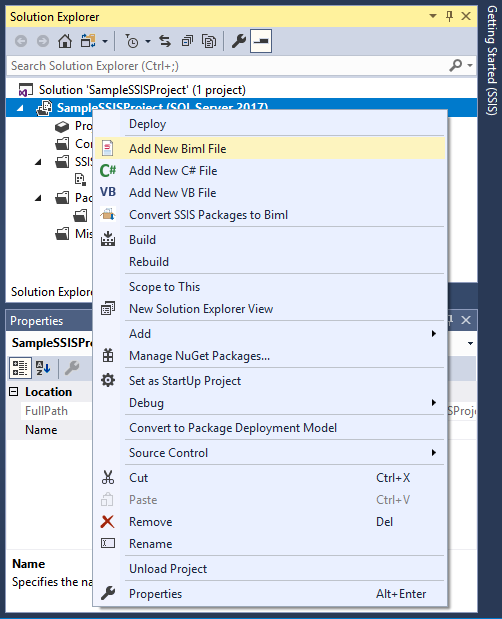
Biml を使用すると、スクリプトを記述して SSIS プロジェクト、パッケージ、タスクを動的に生成できます。既存のプロジェクトの Biml ファイルを確認する(CData SSIS タスクでの Biml の使用についてインサイトを得る)には、タスクを作成し、プロジェクトを右クリックして「Convert SSIS Packages to Biml」を選択します。
C# コード
- ディレクティブ <#@ .. #> を使用して、必要な名前空間と CData SSIS Components for SurveyMonkey のアセンブリをインポートします。
<#@ template language="C#" hostspecific="true"#>
<#@ import namespace="System.Data"#>
<#@ import namespace="System.IO"#>
<#@ import namespace="System.Collections"#>
<#@ import namespace="System.Data.CData.SurveyMonkey"#>
<#@ assembly name="C:\Program Files\CData[product_name] 2018\lib\CData.SSIS2017.SurveyMonkey.dll"#>
新しいコントロールナゲット <# ... #> 内で、Biml スクリプト全体で使用される変数を作成します。SurveyMonkey 用の接続文字列と、SurveyMonkey のメタデータを格納する構造体が含まれます。
SurveyMonkey はOAuth 2 認証標準を利用しています。SurveyMonkey がアンケートの回答を読むためにこれを必要とすることを考えると、アンケートを読むアカウントには有料プランのサブスクリプションが必要です。
SurveyMonkey への接続に使用できる認証方法は2つあります。
- プライベートoauth アプリケーションを登録するときに、パーソナルアクセストークンを使用します。
- パブリックoauth アプリケーションを登録するときに、OAuth を使用します。
パーソナルアクセストークンの使用
個人用トークンを使用して、自分のデータをテストし、アクセスします。個人用トークンを取得するには、ヘルプの「Creating a Custom OAuth App」の手順に従って、次の接続プロパティを設定します。
- OAuthAccessToken:アプリケーション設定で生成されたAccessToken に設定。
- InitiateOAuth:OFF に設定。
OAuth の使用
CData 製品はすでにSurveyMonkey にOAuth アプリケーションとして登録されています。そのため、デフォルトでは、自動的に埋め込みクレデンシャルを使用して接続します。
独自のカスタムOAuth アプリを使用したい場合は、ヘルプのCustom Credentials を参照してください。
var surveymonkeyConnectionString = "OAuthClientId=MyOAuthClientId;OAuthClientSecret=MyOAuthClientSecret;CallbackURL=http://localhost:portNumber;";
var replicationServer = "SERVER";
var replicationCatalog = "CATALOG";
var replicationUserID = "sqluser";
var replicationPassword = "sqlpassword";

List<string> allEntityNames = new List<string>();
Hashtable entitySchema = new Hashtable();
- 変数を定義したのと同じコントロールナゲット内で、ADO.NET コードを使用して SurveyMonkey のエンティティ(テーブル)とフィールド(カラム)をプログラムでクエリします。
using (SurveyMonkeyConnection connection = new SurveyMonkeyConnection(surveymonkeyConnectionString)) {
  connection.Open();
  var entities = connection.GetSchema("Tables").Rows;
  foreach (DataRow entity in entities)
  {
    allEntityNames.Add(entity["TABLE_NAME"].ToString());
  }
  foreach (string entity in allEntityNames){
    var columns = connection.GetSchema("Columns", new string [] {entity}).Rows;
    entitySchema.Add(entity,columns);
  }
}
クラスナゲット
レプリケーションタスクを作成する Biml スクリプトでは、繰り返し XML 要素を動的に作成する箇所が複数あります(主に SSIS タスクのカラム用)。コードの重複を避けるため、クラスナゲット <#+ ... #> を追加し、繰り返しコードを統合するヘルパークラスとメソッドを作成します(完全なコードは記事末尾に掲載)。
- 作成する XML 要素のタイプを決定するパブリック静的変数を追加します。
public static int OUTPUT_WITH_ERROR = 0;
public static int EXTERNAL = 1;
public static int OUTPUT = 2;
public static int DATAOVERRIDE_COLUMN = 4;
- ExecuteSQL タスクで既存テーブルの削除とレプリケーションデータ用の新しいテーブルを作成するための SQL ステートメントを構築するパブリックメソッドを追加します。
// テーブル名とメタデータを使用して、SurveyMonkey の各エンティティ(テーブル)に対する // DROP TABLE と CREATE ステートメントを動的に構築します。 public static string GetDeleteAndCreateStatement(string tableName, DataRowCollection columns) { ... } - カラムベースの XML 要素のコレクションを構築するパブリックメソッドを追加します。
// カラムのメタデータと親要素に基づいて、SurveyMonkey の各エンティティ(テーブル)に対する
// さまざまなカラムベースの XML 要素を動的に構築します。
public static string GetColumnDefs(DataRowCollection columns, int columnType){
  ...
}
Biml スクリプト
テーブルのメタデータと繰り返しコードを削減する Helper クラスが揃ったので、レプリケーションパッケージを動的に作成する Biml スクリプトを記述します。
- まず、CData SSIS タスク用の CustomSsisConnection 要素を追加します。ObjectData 属性は XML エンコードする必要があることに注意してください。典型的な接続文字列は以下のようになります(ConnectionString プロパティに surveymonkeyConnectionString 変数を使用していることに注意):
<SurveyMonkeyConnectionManager>
  <Property Name="ConnectionString"><#=surveymonkeyConnectionString#></Property>
</SurveyMonkeyConnectionManager>
CData SSIS タスクへの接続を設定したら、レプリケーションデータベースへの接続を設定します。完成した Connections 要素は以下のようになります(接続文字列の値を追加するためにテキストナゲット <#= ... #> を使用していることに注意):
<Connections> <CustomSsisConnection Name="CData SurveyMonkey Connection Manager" CreationName = "CDATA_SURVEYMONKEY" ObjectData = "<SurveyMonkeyConnectionManager> <Property Name="ConnectionString"> <#=surveymonkeyConnectionString#></Property> </SurveyMonkeyConnectionManager>" /> <Connection Name="Destination" ConnectionString="Data Source=<#=replicationServer#>;User ID=<#=replicationUserID#>;Password=<#=replicationPassword#>;Initial Catalog=<#=replicationCatalog#>;Provider=SQLNCLI11.1;"/> </Connections>
Connections 要素の設定が完了したら、レプリケーションパッケージを構築する準備が整いました。パッケージ内で、Biml スクリプトはレプリケーションする各テーブルに対して ExecuteSQL タスクと Dataflow タスクを作成します。
各タスクセットを構築するには、コントロールナゲット内で while ループを使用してエンティティ(テーブル)名を反復処理します:
int entityCounter = 0; while(entityCounter < allEntityNames.Count){ var tableName = allEntityNames[entityCounter].ToString(); DataRowCollection columns = ((DataRowCollection)entitySchema[tableName]);- ExecuteSQL タスク
ExecuteSQL タスクでは、SurveyMonkey エンティティ(テーブル)と同じ名前の既存テーブルを削除し、CData SSIS Components を使用して検出したメタデータに基づいて新しいテーブルを作成する SQL クエリを実行します。
クエリを動的に作成するには、Helper.GetDeleteAndCreateStatement() ヘルパー関数を使用します。
- Dataflow タスク
Dataflow 内では、CustomComponent をソースコンポーネントとして、OleDbDestination をデスティネーションとして使用します。
- CustomComponent 要素
CustomComponent 要素は、CData SSIS Source コンポーネントを使用してSurveyMonkey のデータを取得します。まず、CData コンポーネントで使用するようにコンポーネントを設定します。
<CustomComponent Name="CData SurveyMonkey Source" ComponentTypeName="CData.SSIS.SurveyMonkey.SurveyMonkeySource" Version="18" ContactInfo="[email protected]" UsesDispositions="true">
...
</CustomComponent>
DataflowOverrides 要素と OutputPaths 要素
接続の設定後の次のステップは、DataflowOverrides 要素の OutputPath 子要素に Columns 要素を追加することです。これには Helper.GetColumnDefs() ヘルパー関数を呼び出します。
同じ Helper クラスを使用して、さまざまな OutputPaths 要素の OutputColumns および ExternalColumns 子要素にカラムを追加します。
作成された定義は、SSIS コンポーネントの入力、出力、エラー情報を提供します。
<DataflowOverrides>
  <OutputPath OutputPathName="CData SurveyMonkey Source Output">
    <Columns>
<#=HelperClass.GetColumnDefs(columns,HelperClass.DATAOVERRIDE_COLUMN) #>
    </Columns>
  </OutputPath>
</DataflowOverrides>
...
<OutputPaths>
  <OutputPath Name="CData SurveyMonkey Source Output">
    <OutputColumns>
<#=HelperClass.GetColumnDefs(columns,HelperClass.OUTPUT_WITH_ERROR) #>
    </OutputColumns>
    <ExternalColumns>
<#=HelperClass.GetColumnDefs(columns,HelperClass.EXTERNAL) #>
    </ExternalColumns>
  </OutputPath>
  <OutputPath Name="CData SurveyMonkey Source Error Output" IsErrorOutput="true">
    <OutputColumns>
<#=HelperClass.GetColumnDefs(columns,HelperClass.OUTPUT) #
    </OutputColumns>
  </OutputPath>
</OutputPaths>
CustomProperties 要素
CData SSIS タスクは、一連の必須 CustomProperties を持つカスタムコンポーネントとして SSIS に表示されます:
<CustomProperties>
  <CustomProperty Name="SQLStatement" DataType="Null" UITypeEditor="Microsoft.DataTransformationServices.Controls.ModalMultilineStringEditor, Microsoft.DataTransformationServices.Controls, Version= 10.0.0.0, Culture=neutral, PublicKeyToken=89845dcd8080cc91" SupportsExpression="true"></CustomProperty>
  <CustomProperty Name="AccessMode" DataType="Int32" TypeConverter="CData.SSIS.SurveyMonkey.AccessModeToStringConverter">0</CustomProperty>
  <CustomProperty Name="TableOrView" DataType="String" UITypeEditor="Microsoft.DataTransformationServices.Controls.ModalMultilineStringEditor, Microsoft.DataTransformationServices.Controls, Version= 10.0.0.0, Culture=neutral, PublicKeyToken=89845dcd8080cc91" SupportsExpression="true">[<#=tableName#>]</CustomProperty>
  <CustomProperty Name="ExecStoredProcedure" DataType="Boolean">false</CustomProperty>
</CustomProperties>
Connections 要素
CustomComponent 要素に追加する最後の要素は Connections 要素で、事前に定義した接続をタスクにアタッチします:
<Connections>
  <Connection Name="SurveyMonkey 2018 Connection" ConnectionName="CData SurveyMonkey Connection Manager" />
</Connections>
- OleDbDestination 要素
Dataflow タスクの最後の部分は OleDbDestination 要素です。事前に定義した OleDbConnection を要素にアタッチし、InputPath と ExternalTableOutput を設定します:
<OleDbDestination Name="OLE DB Destination" ConnectionName="Destination" CheckConstraints="false">
  <InputPath OutputPathName="CData SurveyMonkey Source.CData SurveyMonkey Source Output" />
  <ExternalTableOutput Table="[<#=tableName#>]" />
</OleDbDestination>
- CustomComponent 要素
- ExecuteSQL タスク
- エンティティ(テーブル)名のコレクションを反復処理するために使用されるカウンターをインクリメントするコントロールナゲットを使用します。これは Tasks 要素内、Dataflow 要素の終了後に記述します:
...
          </Dataflow>
<# entityCounter++;}#>
        </Tasks>
    </Package>
  </Packages>
</Biml>
SSIS プロジェクトのビルド
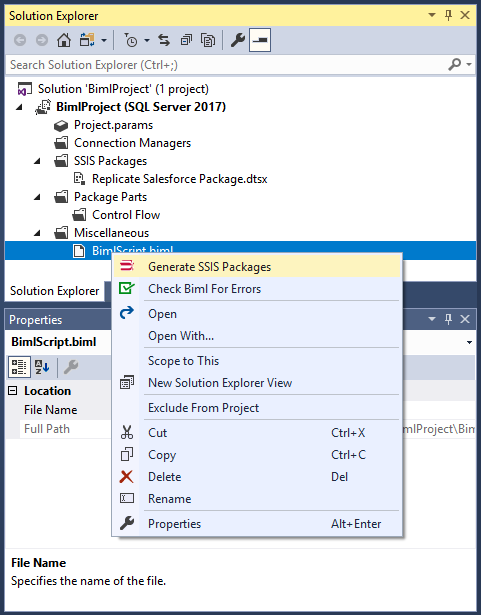
Biml ファイルの記述が完了したら、Server Explorer で Biml ファイルを右クリックし、「Generate SSIS Packages」を選択します。この時点で、Visual Studio と BimlExpress が Biml ファイルを実行可能な SSIS パッケージに変換します。
パッケージを実行して、SurveyMonkey のデータの SQL Server データベース(または選択した他のデスティネーション)へのレプリケーションを開始します。
無料トライアルと詳細情報
CData SSIS Components for SurveyMonkey を使用すると、SSIS パッケージから直接SurveyMonkey のデータに SQL でアクセスできます。Biml を使用すれば、これらのパッケージを自動的に生成できます。CData SSIS Components for SurveyMonkey の詳細については、製品ページをご覧ください。30 日間の無料トライアルでいつでもお試しいただけます。ご不明な点がございましたら、いつでも CData サポートチームにお問い合わせください。
完全な Biml ファイル
<#@ template language="C#" hostspecific="true"#>
<#@ import namespace="System.Data"#>
<#@ import namespace="System.IO"#>
<#@ import namespace="System.Collections"#>
<#@ import namespace="System.Data.CData.SurveyMonkey"#>
<#@ assembly name="C:\Program Files\CData\CData SSIS Components for SurveyMonkey 2018\lib\CData.SSIS2017.SurveyMonkey.dll"#>
<#
var surveymonkeyConnectionString = "OAuthClientId=MyOAuthClientId;OAuthClientSecret=MyOAuthClientSecret;CallbackURL=http://localhost:portNumber;";
var replicationServer = "JDG";
var replicationCatalog = "BIML";
var replicationUserID = "sqltest";
var replicationPassword = "sqltest";
List<string> allEntityNames = new List<string>();
Hashtable entitySchema = new Hashtable();
using (SurveyMonkeyConnection connection = new SurveyMonkeyConnection(surveymonkeyConnectionString)) {
connection.Open();
var entities = connection.GetSchema("Tables").Rows;
foreach (DataRow entity in entities)
{
allEntityNames.Add(entity["TABLE_NAME"].ToString());
}
foreach (string entity in allEntityNames){
var columns = connection.GetSchema("Columns", new string [] {entity}).Rows;
entitySchema.Add(entity,columns);
}
}#>
<Biml xmlns="http://schemas.varigence.com/biml.xsd">
<Connections>
<CustomSsisConnection Name="CData SurveyMonkey Connection Manager" CreationName="CDATA_SURVEYMONKEY" ObjectData="<SurveyMonkeyConnectionManager><Property Name="ConnectionString"><#=surveymonkeyConnectionString#></Property></SurveyMonkeyConnectionManager>"/>
<Connection Name="Destination" ConnectionString="Data Source=<#=replicationServer#>;User ID=<#=replicationUserID#>;Password=<#=replicationPassword#>;Initial Catalog=<#=replicationCatalog#>;Provider=SQLNCLI11.1;"/>
</Connections>
<Packages>
<Package Name="Replicate SurveyMonkey Package" Language="None" ConstraintMode="LinearOnCompletion" ProtectionLevel="EncryptSensitiveWithUserKey">
<Tasks>
<# int entityCounter = 0; while(entityCounter < allEntityNames.Count){
var tableName = allEntityNames[entityCounter].ToString();
if (tableName.Equals("IdpEventLog")) break;
DataRowCollection columns = ((DataRowCollection)entitySchema[tableName]);#>
<ExecuteSQL Name="Create <#=tableName#> Replication Table" ConnectionName="Destination">
<DirectInput>
<#=HelperClass.GetDeleteAndCreateStatement(tableName,columns)#>
</DirectInput>
</ExecuteSQL>
<Dataflow Name="Replicate <#=tableName#>">
<Transformations>
<CustomComponent Name="CData SurveyMonkey Source" ComponentTypeName="CData.SSIS.SurveyMonkey.SurveyMonkeySource" Version="18" ContactInfo="[email protected]" UsesDispositions="true">
<DataflowOverrides>
<OutputPath OutputPathName="CData SurveyMonkey Source Output">
<Columns>
<#=HelperClass.GetColumnDefs(columns,HelperClass.DATAOVERRIDE_COLUMN) #>
</Columns>
</OutputPath>
</DataflowOverrides>
<CustomProperties>
<CustomProperty Name="SQLStatement" DataType="Null" UITypeEditor="Microsoft.DataTransformationServices.Controls.ModalMultilineStringEditor, Microsoft.DataTransformationServices.Controls, Version= 10.0.0.0, Culture=neutral, PublicKeyToken=89845dcd8080cc91" SupportsExpression="true"></CustomProperty>
<CustomProperty Name="AccessMode" DataType="Int32" TypeConverter="CData.SSIS.SurveyMonkey.AccessModeToStringConverter">0</CustomProperty>
<CustomProperty Name="TableOrView" DataType="String" UITypeEditor="Microsoft.DataTransformationServices.Controls.ModalMultilineStringEditor, Microsoft.DataTransformationServices.Controls, Version= 10.0.0.0, Culture=neutral, PublicKeyToken=89845dcd8080cc91" SupportsExpression="true">[<#=tableName#>]</CustomProperty>
<CustomProperty Name="ExecStoredProcedure" DataType="Boolean">false</CustomProperty>
</CustomProperties>
<OutputPaths>
<OutputPath Name="CData SurveyMonkey Source Output">
<OutputColumns>
<#=HelperClass.GetColumnDefs(columns,HelperClass.OUTPUT_WITH_ERROR) #>
</OutputColumns>
<ExternalColumns>
<#=HelperClass.GetColumnDefs(columns,HelperClass.EXTERNAL) #>
</ExternalColumns>
</OutputPath>
<OutputPath Name="CData SurveyMonkey Source Error Output" IsErrorOutput="true">
<OutputColumns>
<#=HelperClass.GetColumnDefs(columns,HelperClass.OUTPUT) #>
</OutputColumns>
</OutputPath>
</OutputPaths>
<Connections>
<Connection Name="SurveyMonkey 2018 Connection" ConnectionName="CData SurveyMonkey Connection Manager" />
</Connections>
</CustomComponent>
<OleDbDestination Name="OLE DB Destination" ConnectionName="Destination" CheckConstraints="false">
<InputPath OutputPathName="CData SurveyMonkey Source.CData SurveyMonkey Source Output" />
<ExternalTableOutput Table="[<#=tableName#>]" />
</OleDbDestination>
</Transformations>
</Dataflow>
<# entityCounter++;}#>
</Tasks>
</Package>
</Packages>
</Biml>
<#+
public static class HelperClass {
public static int OUTPUT_WITH_ERROR = 0;
public static int EXTERNAL = 1;
public static int OUTPUT = 2;
public static int DATAOVERRIDE_COLUMN = 4;
public static string GetDeleteAndCreateStatement(string tableName, DataRowCollection columns) {
var dropAndCreateStatement =
"IF EXISTS (SELECT * FROM sys.objects WHERE object_id = OBJECT_ID(N'[{0}]') AND type IN (N'U'))\r\n" +
"DROP TABLE [{0}];\r\n" +
"CREATE TABLE [{0}]\r\n" +
"(\r\n" +
"{1}\r\n" +
")\r\n" +
"ON \"default\";";
string columnDefs = "";
foreach (DataRow column in columns){
string columnDef = " [{0}] {1}";
string dataType = column["DATA_TYPE"].ToString();
if (dataType.ToLower().StartsWith("bool")) {
dataType = "bit";
} else if (dataType.ToLower().Equals("real")) {
dataType = "float";
} else if (dataType.ToLower().Contains("varchar")) {
var columnLength = column["CHARACTER_MAXIMUM_LENGTH"];
dataType = "nvarchar(" + ((int)columnLength > 4000 ? "MAX" : columnLength) + ")";
}
columnDefs += String.Format(columnDef,column["COLUMN_NAME"],dataType) + ",\r\n";
}
columnDefs = columnDefs.Remove(columnDefs.LastIndexOf(",\r\n"),",\r\n".Length);
return String.Format(dropAndCreateStatement,tableName,columnDefs);
}
public static string GetColumnDefs(DataRowCollection columns, int columnType){
var columnDefTemplate = "";
var columnElements = "";
if (columnType == DATAOVERRIDE_COLUMN) {
columnDefTemplate = " <Column ErrorRowDisposition=\"FailComponent\" TruncationRowDisposition=\"FailComponent\" ColumnName=\"{0}\" />\r\n";
foreach(DataRow column in columns) {
var columnName = column["COLUMN_NAME"];
columnElements += String.Format(columnDefTemplate,columnName);
}
return columnElements;
}
if (columnType == OUTPUT_WITH_ERROR)
columnDefTemplate = " <OutputColumn Name=\"{0}\" {1} ExternalMetadataColumnName=\"{0}\" ErrorRowDisposition=\"FailComponent\" TruncationRowDisposition=\"FailComponent\" />\r\n";
else if (columnType == EXTERNAL)
columnDefTemplate = " <ExternalColumn Name=\"{0}\" {1} />\r\n";
else if (columnType == OUTPUT)
columnDefTemplate = " <OutputColumn Name=\"{0}\" {1} />\r\n";
foreach(DataRow column in columns){
var columnName = column["COLUMN_NAME"];
var dataTypeRaw = column["DATA_TYPE"].ToString().ToLower();
var typeAndRelatedInfo = "";
if (dataTypeRaw.Equals("bool")) {
typeAndRelatedInfo = "DataType=\"Boolean\"";
} else if (dataTypeRaw.Equals("date")) {
typeAndRelatedInfo = "DataType=\"Date\" SsisDataTypeOverride=\"DT_DBDATE\"";
} else if (dataTypeRaw.Equals("datetime")) {
typeAndRelatedInfo = "DataType=\"DateTime\"";
} else if (dataTypeRaw.Equals("real")) {
typeAndRelatedInfo = ((int)column["NumericPrecision"] > 0 ? "Precision=\"18\" " : " ") + ((int)column["NumericScale"] > 0 ? "Scale=\"15\" " : " ") + "DataType=\"Decimal\"";
} else if (dataTypeRaw.Equals("varchar")) {
var columnLength = column["CHARACTER_MAXIMUM_LENGTH"];
if ((int)columnLength > 4000) {
typeAndRelatedInfo = "DataType=\"String\"";
} else {
typeAndRelatedInfo = "Length=\"" + columnLength + "\" DataType=\"String\" CodePage=\"1252\"";
}
}
columnElements += String.Format(columnDefTemplate,columnName,typeAndRelatedInfo);
}
return columnElements;
}
}
#>
はじめる準備はできましたか?
SurveyMonkey SSIS Component の無料トライアルをダウンロードしてお試しください:
ダウンロード詳細:
 SurveyMonkey SSIS Components
お問い合わせ
SurveyMonkey SSIS Components
お問い合わせ
SSIS ソース元 & 接続先コンポーネントは、SQL Server SSIS のワークフロー内で簡単にSurveyMonkey データにリアルタイム接続できる強力なツールです。
データフロー内のSurveyMonkey コンポーネントを使ってRollups、Surveys、Questions などを同期できます。データ同期、ローカルバックアップ、ワークフローの自動化などに最適!