





QuickBooks Online レポート機能の拡張
CData QuickBooks Online Data Provider を使用すると、QuickBooks Online で利用可能なほぼすべてのレポートをリクエストできます。レポートはビュー(読み取り専用テーブル)としてアクセスできます。この記事では、ADO.NET プロバイダーを使用して QuickBooks Online レポートに対して SQL クエリを実行する方法を説明します。
CData QuickBooks Online Data Provider では、デフォルトではレポートはテーブルとして表示されません。対応するストアドプロシージャを呼び出すことで、必要なレポートのスキーマ(ビュー定義)を生成できます。
レポートスキーマの生成
ストアドプロシージャを呼び出す前に、まず Location 接続プロパティをテーブルスキーマの保存場所に設定する必要があります。 Location プロパティを設定したら、必要な入力パラメータを指定してストアドプロシージャを呼び出します。
EXEC CreateProfitAndLossSummaryReport
再接続すると、プロバイダーは新しく作成されたスキーマを認識します。スキーマは、カラム定義や許可されるカラム値を含むシンプルな XML ベースのファイルです。
.rsd ファイルを開くと、WHERE 句でカラムを使用する方法についての情報を簡単に確認できます。カラムは rsb:info セクションの attr 属性で定義されています。また、疑似カラムは input 属性で定義されており、WHERE 句で使用できます。以下は、ProfitAndLossSummaryReport ビューのカラムと許可される値の例です:
<rsb:info title="ProfitAndLossSummaryReport" description="The QuickBooks report ProfitAndLoss.">
  <attr name="Account" xs:type="string" readonly="true" desc="A column for Account containing Account data." />
  <attr name="Total" xs:type="double" readonly="true" desc="A column for Total containing Money data." />
  <input name="StartDate"                  desc="The startdate of the report. StartDate must be less than EndDate." default="2015-01-01"/>
  <input name="EndDate"                    desc="The enddate of the report. EndDate must be greater than StartDate." default="2015-12-31"/>
  <input name="DateMacro"                  desc="A predefined date range. Use this if you want the report to cover a standard report date range. Otherwise, use the StartDate and EndDate to cover an explicit range."  values="Today,Yesterday,This Week,This Week-to-date,Last Week,Last Week-to-date,Next Week,Next 4 Weeks,This Month,This Month-to-date,Last Month,Last Month-to-date,Next Month,This Fiscal Quarter,This Fiscal Year,This Fiscal Year-to-date,Last Fiscal Year,Last Fiscal Year-to-date,Next Fiscal Year" />
  <input name="AccountingMethod"           desc="The accounting method used in the report." values="Cash,Accrual" />
  <input name="Customer"                   desc="Filters report contents to include information for specified customers. This is a comma separated list of one or more Customer IDs." />
  <input name="Vendor"                     desc="Filters report contents to include information for specified vendors. This is a comma separated list of one or more Vendor IDs." />
  <input name="Item"                       desc="Filters report contents to include information for specified items. This is a comma separated list of one or more Item IDs." />
  <input name="Class"                      desc="Filters report contents to include information for specified classes if so configured in the company file. This is a comma separated list of one or more Class IDs." />
  <input name="Department"                 desc="Filters report contents to include information for specified departments if so configured in the company file. This is a comma separated list of one or more Department IDs." />
</rsb:info>
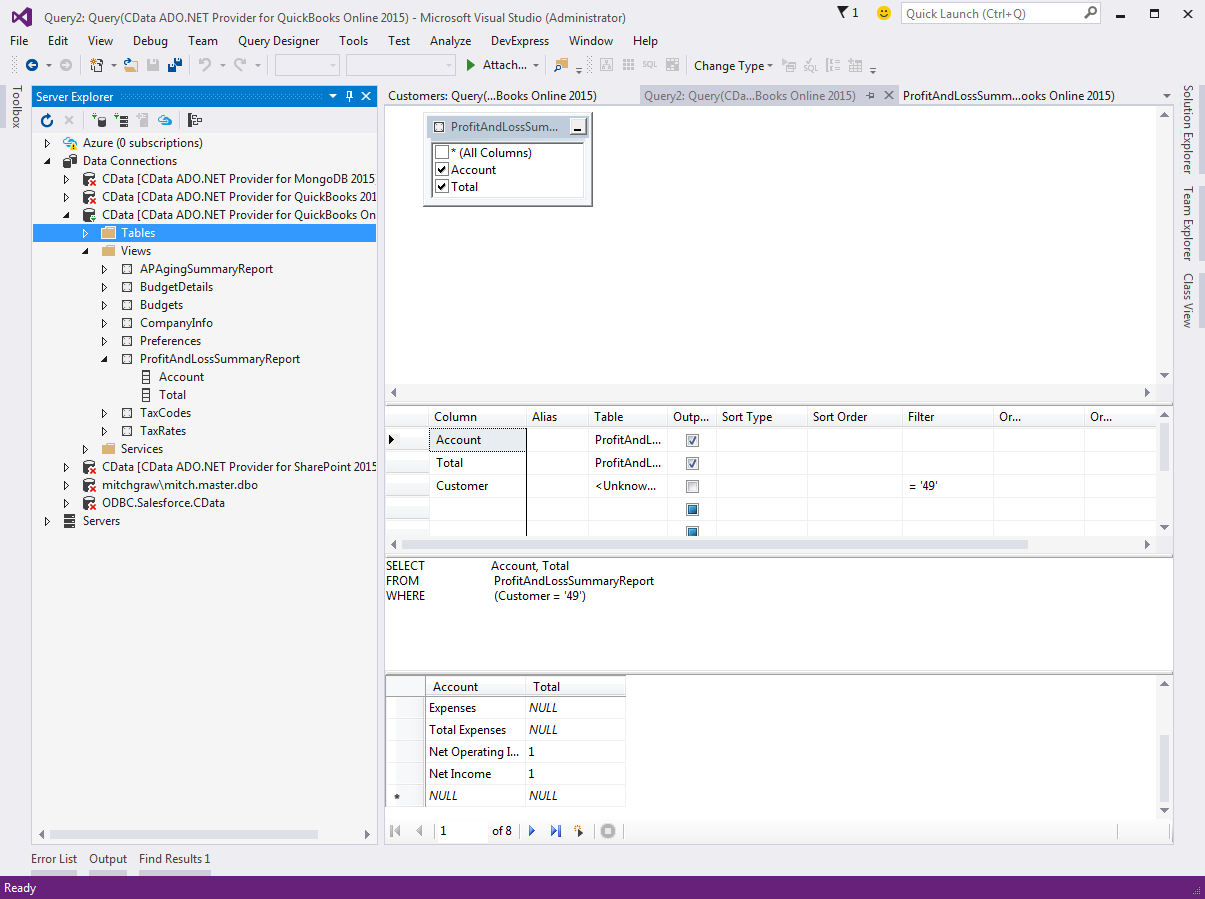
これで、レポートに対してクエリを実行できます:
SELECT * FROM ProfitAndLossSummaryReport WHERE StartDate='1/1/2015' AND EndDate='12/31/2015'
サーバーエクスプローラーでは、レポートは Views フォルダに表示されます:
サンプルスキーマ
QuickBooks レポートへのアクセスをすぐに開始できるよう、サンプルレポートスキーマをダウンロードできます。このスキーマを使用すると、aging summary と profit and loss summary のレポートにすぐにクエリを実行できます。.rsd ファイルをインストールディレクトリの db サブフォルダにコピーし、Location プロパティをこのフォルダに設定して再接続するだけで利用できます。 CodeProject