






MySQL のFederated Table としてCircleCI のデータを連携利用する

SQL Gateway を使って、MySQL リモーティングサービスを作成し、CircleCI のMySQL Federated Table を構築できます。CData ODBC Driver for API のMySQL インターフェースのdeamon になります。サービス起動後、MySQL のFEDERATED ストレージエンジンを使ってサーバーおよびテーブルを作成します。CircleCI のデータ をMySQL テーブルのように使いましょう。
CircleCI のデータへの接続
If you have not already done so, provide values for the required connection properties in the data source name (DSN). You can use the built-in Microsoft ODBC Data Source Administrator to configure the DSN. This is also the last step of the driver installation. See the "Getting Started" chapter in the help documentation for a guide to using the Microsoft ODBC Data Source Administrator to create and configure a DSN.
API キー認証の設定
CircleCI は、API リクエストの認証にパーソナル API トークンを使用します。パーソナル API トークンを生成するには、CircleCI アカウントにログインし、User Settings > Personal API Tokens に移動して、Create New Token をクリックします。トークンの値は一度しか表示されないため、すぐにコピーしてください。
以下の接続プロパティを設定して接続を確立してください:
- AuthScheme:APIKey に設定します。
- APIKey:CircleCI のパーソナル API トークンに設定します。
接続文字列の例:
Profile=C:\profiles\CircleCI.apip;AuthScheme=APIKey;ProfileSettings='APIKey=your_personal_api_token';
SQL Gateway の設定
See the SQL Gateway Overview to set up connectivity to CircleCI のデータ as a virtual MySQL database. You will configure a MySQL remoting service that listens for MySQL requests from clients. The service can be configured in the SQL Gateway UI.
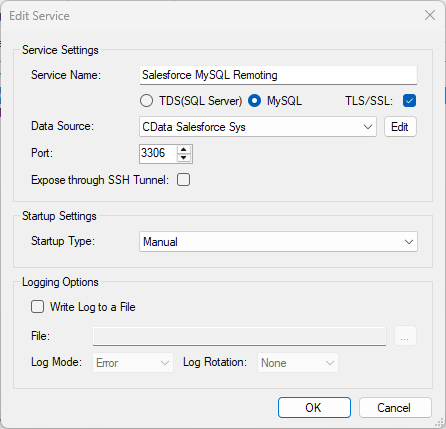
CircleCI データのFEDERATED サーバーおよびテーブルを作成
After you have configured and started the service, create a FEDERATED server to simplify the process of creating FEDERATED tables:
FEDERATED サーバーの作成
The following statement will create a FEDERATED server based on the ODBC Driver for API. Note that the username and password of the FEDERATED server must match a user account you defined on the Users tab of the SQL Gateway.
CREATE SERVER fedAPI
FOREIGN DATA WRAPPER mysql
OPTIONS (USER 'sql_gateway_user', PASSWORD 'sql_gateway_passwd', HOST 'sql_gateway_host', PORT ####, DATABASE 'CData API Sys');
FEDERATED テーブルの作成
To create a FEDERATED table using our newly created server, use the CONNECTION keyword and pass the name of the FEDERATED server and the remote table (Artifacts). Refer to the following template for the statement to create a FEDERATED table:
CREATE TABLE fed_artifacts (
  ...,
    TYPE(LEN),
    TYPE(LEN),
  ...,
)
ENGINE=FEDERATED
DEFAULT CHARSET=latin1
CONNECTION='fedAPI/artifacts';
NOTE: The table schema for the FEDERATED table must match the remote table schema exactly. You can always connect directly to the MySQL remoting service using any MySQL client and run a SHOW CREATE TABLE query to get the table schema.
クエリの実行
You can now execute queries to the CircleCI FEDERATED tables from any tool that can connect to MySQL, which is particularly useful if you need to JOIN data from a local table with data from CircleCI. Refer to the following example:
SELECT
  fed_artifacts.,
  local_table.custom_field
FROM
  local_table
JOIN
  fed_artifacts
ON
  local_table.foreign_ = fed_artifacts.;