






TIBCO Data Virtualization で Excel Online のデータ にリアルタイムアクセスする方法
TIBCO Data Virtualization(TDV)は、複数の多様なデータソースへのアクセスを一元管理するエンタープライズデータ仮想化ソリューションです。CData TIBCO DV Adapter for Excel Online と組み合わせることで、TIBCO Data Virtualization 内からExcel Online のデータに直接フェデレーテッドアクセスが可能になります。この記事では、アダプターのデプロイと Excel Online に基づく新しいデータソースの作成手順を解説します。
CData TIBCO DV Adapter は、最適化されたデータ処理機能が組み込まれており、Excel Online のデータ とのインタラクションにおいて比類のないパフォーマンスを発揮します。Excel Online に対して複雑な SQL クエリを発行すると、アダプターはフィルタや集計などサポートされている SQL 操作を直接 Excel Online にプッシュします。組み込みの動的メタデータクエリにより、ネイティブのデータ型を使用してExcel Online のデータを操作・分析できます。
Excel Online TIBCO DV Adapter のデプロイ
コンソールで、TDV Server のインストールディレクトリ内の bin フォルダに移動します。現在のバージョンのアダプターがインストールされている場合は、先にアンデプロイする必要があります。
.\server_util.bat -server localhost -user admin -password ******** -undeploy -version 1 -name ExcelOnline
CData TIBCO DV Adapter をローカルフォルダに解凍し、解凍した場所から JAR ファイル(tdv.excelonline.jar)をサーバーにデプロイします。
.\server_util.bat -server localhost -user admin -password ******** -deploy -package /PATH/TO/tdv.excelonline.jar
新しい JAR ファイルが正しくロードされるように、サーバーの再起動が必要な場合があります。再起動は、C:\Program Files\TIBCO\TDV Server <version>\bin にある composite.bat スクリプトを実行して行えます。サーバーを再起動した後は、TDV Studio への再認証が必要です。
再起動コマンドの例
.\composite.bat monitor restart
OAuth を使用して Excel Online で認証する
Excel Online は OAuth プロトコルを使用して認証を行いますが、TDV Studio は内部でブラウザベースの認証をサポートしていないため、OAuth トークンを取得するための簡単な Java アプリケーションを作成して実行する必要があります。取得したトークンは、アダプターから直接 Excel Online に接続するために使用されます。
Create the Java Application
- Create a new Java file with preferred name for example GenOAuthSettings.java. This Java file leverages the ExcelOnlineOAuth class contained within the TDV Adapter JAR to initiate a test connection and perform the required OAuth authentication flow
- Copy and insert the following code into the .java file:
- Place the .java file in the same directory as the tdv.excelonline.jar file. This is required to prevent classpath resolution errors during compilation and execution
public class GenOAuthSettings {
    public static void main(String[] args) {
        try {
    	    if (args.length != 2) {
    			throw new Exception("Input must have two arguments: 'data source', 'connection string'");
    		}

    		String source = args[0].replace(" ", "").toLowerCase();
    		String connectionString = args[1];
    		String prefix;

    		if (source.equals("excelonline")) {
    			prefix = "jdbc:excelonline:";

    			com.cdata.cis.excelonline.ExcelOnlineOAuth oauth = new com.cdata.cis.excelonline.ExcelOnlineOAuth();

    			if (!connectionString.startsWith(prefix)) connectionString = prefix + connectionString;
    			oauth.generateOAuthSettingsFile(connectionString);
    		}
    		// More sources can be added below using the same format.  You must add the import statement and ensure the jar file resides in the classpath
			//            else if (source.equals("googlebigquery") || source.equals("bigquery")) {
			//                prefix = "jdbc:googlebigquery:";
			//
			//                com.cdata.cis.googlebigquery.GoogleBigQueryOAuth oauth = new com.cdata.cis.googlebigquery.GoogleBigQueryOAuth();
			//
			//                if (!connectionString.startsWith(prefix)) connectionString = prefix + connectionString;
			//                oauth.generateOAuthSettingsFile(connectionString);
			//            }
    		else {
				throw new Exception("Data Source not supported.  Available Data Sources: Excel Online");
			}

			System.out.println("Test Connection Successful!");
		} catch (Exception e) {
			e.printStackTrace();
		}
	}
}
Build and run the Java Application
- Open Console and navigate to the directory containing the .java file and adapter jar
- Compile the Java file using the following command:
- Execute the application using one of the following commands:
javac -cp .;tdv.excelonline.jar GenOAuthSettings.java
java -cp .;tdv.excelonline.jar GenOAuthSettings "ExcelOnline" "connection string"
This command initiates the OAuth authentication flow and generates the OAuth settings file at the location specified in the OAuthSettingsLocation parameter. Once you deploy the adapter and authenticate, you can create a new data source for Excel Online in TDV Studio.
TDV Studio で Excel Online データソースを作成する
CData TIBCO DV Adapter for Excel Online を使用すると、Excel Online 用のデータソースを簡単に作成し、データソースをイントロスペクトしてリソースを TDV に追加できます。
データソースの作成
- データソースを追加するフォルダを右クリックし、New -> New Data Source を選択します。
- アダプター(例:Excel Online)が表示されるまでスクロールし、Next をクリックします。
- データソースに名前を付けます(例:CData Excel Online Source)。
必要な接続プロパティを入力します。
ワークブックに接続するには、Excel Online への認証を提供し、 次のプロパティを設定します。
-
Workbook: ワークブックの名前かId に設定。利用可能なワークブックに関する情報のリストを表示する場合は、認証後にWorkbooks ビューに対してクエリを実行します。
- UseSandbox: Sandbox アカウントのワークブックに接続している場合はtrue に設定。それ以外の場合は、これを空のままにしてプロダクションアカウントに接続します。
OAuth 認証を使うこともできます。ユーザー資格情報の接続プロパティを設定せずに接続できます。接続すると、CData 製品はデフォルトブラウザでOAuth エンドポイントを開きます。ログインして、CData 製品にアクセス許可を与えます。CData 製品がOAuth プロセスを完了します。 他のOAuth 認証フローについては、ヘルプドキュメントの「OAuth 認証の使用」を参照してください。
NOTE:DV Adapter の OAuthSettingsLocation プロパティには、OAuth 認証(上記参照)を実行したときと同じ値を設定してください。
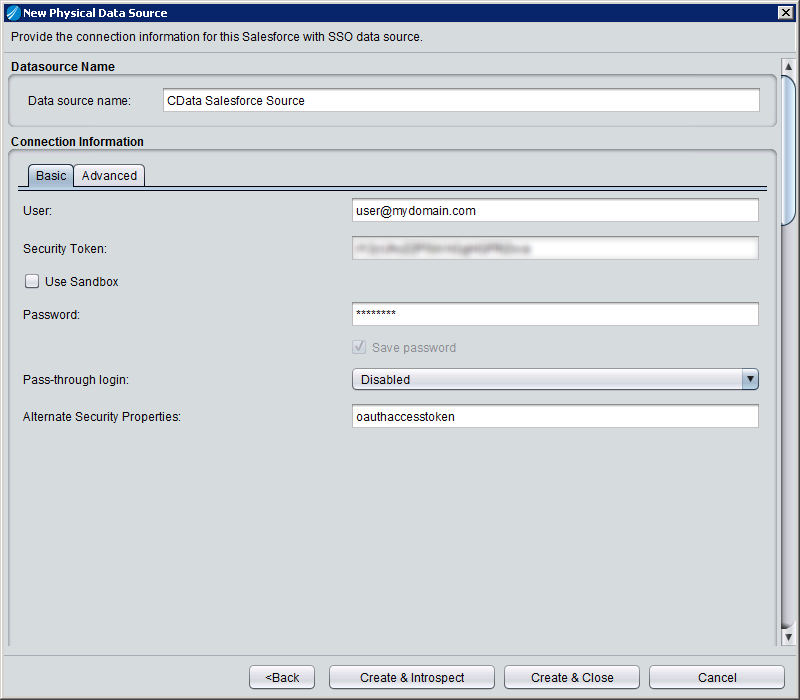
-
- Create & Close をクリックします。
データソースのイントロスペクト
データソースを作成したら、右クリックして Open を選択することでデータソースをイントロスペクトできます。ダッシュボードで Add/Remove Resources をクリックし、データソースの一部として含めるテーブル、ビュー、ストアドプロシージャを選択します。Next をクリックし、Finish をクリックして、選択した Excel Online のテーブル、ビュー、ストアドプロシージャをリソースとして追加します。
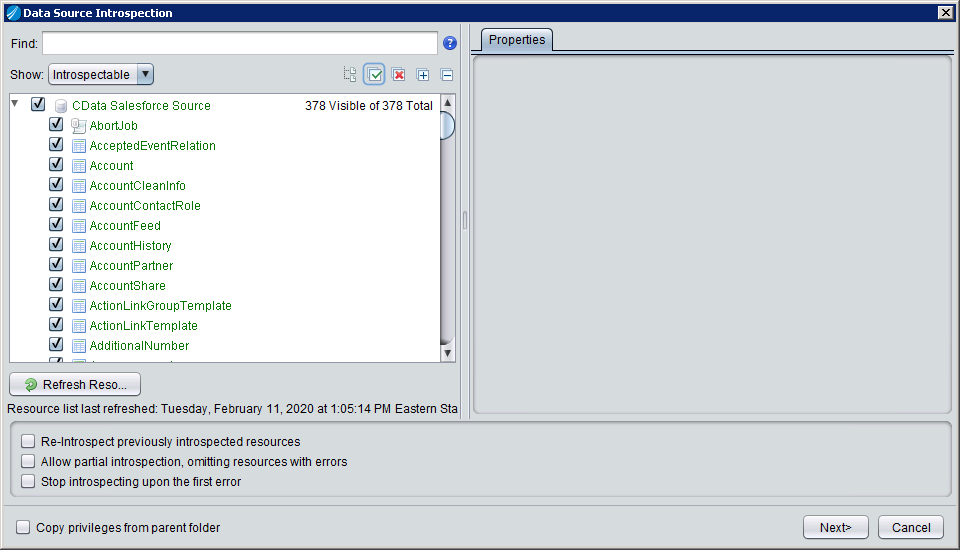
After creating and introspecting the data source, you are ready to work with Excel Online のデータ in TIBCO Data Virtualization just like you would any other relational data source. You can create views, query using SQL, publish the data source, and more.
データソースを作成してイントロスペクトしたら、他のリレーショナルデータソースと同様に TIBCO Data Virtualization でExcel Online のデータを操作できるようになります。ビューの作成、SQL によるクエリ、データソースの公開など、さまざまな操作が可能です。