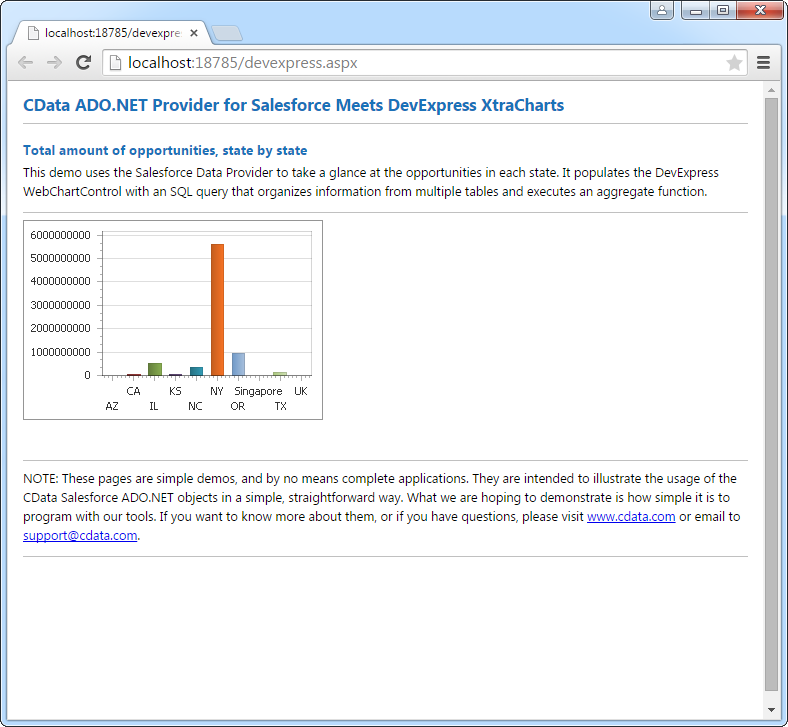
Mocean のデータをDevExpress Data Grid にデータバインドする。

CData API Driver for ADO.NET は、サードパーティ製コントロールと組み合わせて使える標準的なADO.NET データアクセスコンポーネントを備えています。通常のADO.NET データバインドの手順に沿って進めるだけで、UI コントロールからリアルタイムデータへの双方向アクセスを実現できます。この記事では、CData のコンポーネントを使って DevExpress UI コントロール(Windows Forms およびWeb コントロール) にデータバインドする方法を紹介します。今回は、リアルタイムのデータを可視化するチャートにデータバインドしていきます。
API キー認証の設定
Mocean は、API へのアクセスを制御するために API キー認証を使用します。API Key を取得するには、以下のステップで進めます:
- https://dashboard.moceanapi.com で Mocean アカウントにログインします
- アカウント設定または API 認証情報のセクションに移動します
- API Key をコピーします
API Key を取得したら、以下の接続プロパティを設定します:
- AuthScheme:APIKey に設定します。
- APIKey:Mocean の API Key に設定します。これは Authorization ヘッダー内の Bearer トークンとして送信されます。
接続文字列の例
Profile=C:\profiles\Mocean.apip;AuthScheme=APIKey;ProfileSettings='APIKey=your_api_key';
Mocean への接続
認証を設定すると、Mocean に接続して、AccountBalance、AccountPricing、MessageStatus、NumberLookup などの利用可能なテーブルからデータをクエリできます。
Windows Forms コントロール
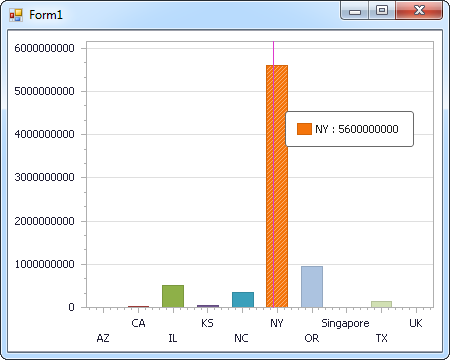
下のコードでは、Mocean でDevExpress のチャートに追加する方法を説明します。APIDataAdapter はチャートコントロールのSeries プロパティにバインドします。コントロールのDiagram プロパティはx 軸とy 軸をカラム名として定義します。
using (APIConnection connection = new APIConnection(
"Profile=C:\profiles\Mocean.apip;AuthScheme=APIKey;ProfileSettings='APIKey=your_api_key';")) {
  APIDataAdapter dataAdapter = new APIDataAdapter(
  "SELECT ,  FROM AccountBalance WHERE  = ''", connection);

  DataTable table = new DataTable();
  dataAdapter.Fill(table);
  DevExpress.XtraCharts.Series series = new DevExpress.XtraCharts.Series();
  chartControl1.Series.Add(series);
  DataTable table = new DataTable();
  series.ValueDataMembers.AddRange(new string[] { "" });
  series.ArgumentScaleType = DevExpress.XtraCharts.ScaleType.Qualitative;
  series.ArgumentDataMember = "";
  series.ValueScaleType = DevExpress.XtraCharts.ScaleType.Numerical;
  chartControl1.Legend.Visibility = DevExpress.Utils.DefaultBoolean.False;
  ((DevExpress.XtraCharts.SideBySideBarSeriesView)series.View).ColorEach = true;
}
Web コントロール
下のコードではMocean でDevExpress Web を操作するための設定方法を説明します。APIDataAdapter はチャートのSeries プロパティにバインドします。Diagram プロパティはx 軸とy 軸をカラム名として定義します。
using DevExpress.XtraCharts;

using (APIConnection connection = new APIConnection(
"Profile=C:\profiles\Mocean.apip;AuthScheme=APIKey;ProfileSettings='APIKey=your_api_key';"))
{
  APIDataAdapter APIDataAdapter1 = new APIDataAdapter("SELECT ,  FROM AccountBalance WHERE  = ''", connection);
  DataTable table = new DataTable();
  APIDataAdapter1.Fill(table);
  DevExpress.XtraCharts.Series series = new Series("Series1", ViewType.Bar);
  WebChartControl1.Series.Add(series);
  DataTable table = new DataTable();
  series.ValueDataMembers.AddRange(new string[] { "" });
  series.ArgumentScaleType = ScaleType.Qualitative;
  series.ArgumentDataMember = "";
  series.ValueScaleType = ScaleType.Numerical;
  ((DevExpress.XtraCharts.SideBySideBarSeriesView)series.View).ColorEach = true;
}