






MySQL のFederated Table としてRabbitMQ のデータを連携利用する

SQL Gateway を使って、MySQL リモーティングサービスを作成し、RabbitMQ のMySQL Federated Table を構築できます。CData ODBC Driver for API のMySQL インターフェースのdeamon になります。サービス起動後、MySQL のFEDERATED ストレージエンジンを使ってサーバーおよびテーブルを作成します。RabbitMQ のデータ をMySQL テーブルのように使いましょう。
RabbitMQ のデータへの接続
If you have not already done so, provide values for the required connection properties in the data source name (DSN). You can use the built-in Microsoft ODBC Data Source Administrator to configure the DSN. This is also the last step of the driver installation. See the "Getting Started" chapter in the help documentation for a guide to using the Microsoft ODBC Data Source Administrator to create and configure a DSN.
RabbitMQ Management HTTP API について
RabbitMQ は、複数のメッセージングプロトコルをサポートするオープンソースのメッセージブローカーです。RabbitMQ Management HTTP API は、RabbitMQ サーバーの管理データと監視データに HTTP 経由でアクセスする手段を提供します。この API では、仮想ホスト、エクスチェンジ、キュー、バインディング、コネクション、チャネル、コンシューマー、ユーザー、権限、ポリシー、クラスター全体の統計情報を取得できます。
HTTP API を利用するには、RabbitMQ サーバーで Management プラグインを有効化する必要があります。デフォルトでは、管理インターフェースはポート 15672 でリッスンします。
Basic 認証の設定
RabbitMQ Management HTTP API は HTTP Basic 認証を使用します。RabbitMQ 管理ユーザーのユーザー名とパスワードを指定する必要があります。
管理 API へのアクセスを有効にするには、以下のステップで進めます:
- サーバーで RabbitMQ Management プラグインが有効になっていることを確認します(rabbitmq-plugins enable rabbitmq_management)。
- 既存の管理ユーザーを使用するか、適切な管理タグ(management、policymaker、monitoring、または administrator)を持つユーザーを作成します。
- RabbitMQ Management HTTP API の完全なベース URL を控えておきます(例:http://localhost:15672)。
RabbitMQ サーバーを設定したら、以下の接続プロパティを設定して接続します:
- AuthScheme:Basic に設定します。
- URL:RabbitMQ Management HTTP API のベース URL に設定します(例:http://localhost:15672)。
- User:RabbitMQ の管理ユーザー名に設定します(例:guest)。
- Password:RabbitMQ の管理パスワードに設定します。
接続文字列の例:
Profile=C:\profiles\RabbitMQ.apip;AuthScheme=Basic;URL=http://localhost:15672;User=guest;Password=guest;
利用可能なテーブル
RabbitMQ プロファイルでは、以下のテーブルにアクセスできます:
- Overview - クラスター全体の統計情報と RabbitMQ ノードに関する情報
- Nodes - RabbitMQ クラスター内の個々のノードに関する情報
- NodeMemory - 特定のクラスターノードの詳細なメモリ使用状況の内訳
- Connections - ブローカーへのすべてのオープンな AMQP コネクションの一覧
- Channels - すべてのコネクションにわたるオープンな AMQP チャネルの一覧
- Consumers - すべてのキューに登録されたコンシューマーの一覧
- Exchanges - すべての仮想ホストで宣言されたエクスチェンジの一覧
- Queues - すべての仮想ホストで宣言されたキューの一覧
- Bindings - エクスチェンジとキュー間のすべてのバインディングの一覧
- VirtualHosts - ブローカーに設定された仮想ホストの一覧
- VhostPermissions - 特定の仮想ホスト内のユーザー権限
- Users - すべての RabbitMQ ユーザーの一覧
- Permissions - すべての仮想ホストにわたる全ユーザーの権限レコード
- TopicPermissions - 全ユーザーのトピックレベルの権限レコード
- Policies - 仮想ホスト内のキューおよびエクスチェンジに適用されたポリシーの一覧
- OperatorPolicies - 仮想ホスト内のキューに適用されたオペレーターポリシーの一覧
- Parameters - 仮想ホストごとのコンポーネントパラメータ(例:federation、shovel)の一覧
- GlobalParameters - すべての仮想ホストに適用されるグローバルパラメータの一覧
- VhostLimits - 特定の仮想ホストに設定されたリソース制限
- UserLimits - 特定のユーザーに設定されたリソース制限
- FeatureFlags - フィーチャーフラグの一覧と、ノード上での有効/無効の状態
- DeprecatedFeatures - 非推奨機能の一覧と、その使用状態
- AuthAttempts - ノードの認証試行統計
- ClusterName - RabbitMQ クラスターの名前
- WhoAmI - 現在認証されている管理ユーザーに関する情報
- ExchangeBindingsSource - 特定のエクスチェンジがソースとなっているバインディング
- ExchangeBindingsDestination - 特定のエクスチェンジが宛先となっているバインディング
- QueueBindings - 仮想ホスト内の特定のキューのバインディング
SQL Gateway の設定
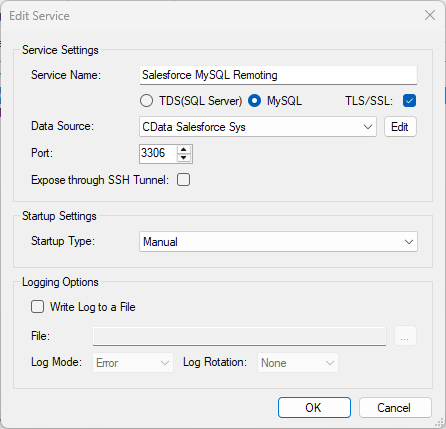
See the SQL Gateway Overview to set up connectivity to RabbitMQ のデータ as a virtual MySQL database. You will configure a MySQL remoting service that listens for MySQL requests from clients. The service can be configured in the SQL Gateway UI.
RabbitMQ データのFEDERATED サーバーおよびテーブルを作成
After you have configured and started the service, create a FEDERATED server to simplify the process of creating FEDERATED tables:
FEDERATED サーバーの作成
The following statement will create a FEDERATED server based on the ODBC Driver for API. Note that the username and password of the FEDERATED server must match a user account you defined on the Users tab of the SQL Gateway.
CREATE SERVER fedAPI
FOREIGN DATA WRAPPER mysql
OPTIONS (USER 'sql_gateway_user', PASSWORD 'sql_gateway_passwd', HOST 'sql_gateway_host', PORT ####, DATABASE 'CData API Sys');
FEDERATED テーブルの作成
To create a FEDERATED table using our newly created server, use the CONNECTION keyword and pass the name of the FEDERATED server and the remote table (AuthAttempts). Refer to the following template for the statement to create a FEDERATED table:
CREATE TABLE fed_authattempts (
  ...,
    TYPE(LEN),
    TYPE(LEN),
  ...,
)
ENGINE=FEDERATED
DEFAULT CHARSET=latin1
CONNECTION='fedAPI/authattempts';
NOTE: The table schema for the FEDERATED table must match the remote table schema exactly. You can always connect directly to the MySQL remoting service using any MySQL client and run a SHOW CREATE TABLE query to get the table schema.
クエリの実行
You can now execute queries to the RabbitMQ FEDERATED tables from any tool that can connect to MySQL, which is particularly useful if you need to JOIN data from a local table with data from RabbitMQ. Refer to the following example:
SELECT
  fed_authattempts.,
  local_table.custom_field
FROM
  local_table
JOIN
  fed_authattempts
ON
  local_table.foreign_ = fed_authattempts.;